The short version
- Total visits: How many people came to your site from search engines
- Trends over time: Tracks if visits are going up or down over time (daily, weekly, or monthly).
- Top-performing pages: Which pages on your site get the most visitors.
On this page8 sections
Tracking the effectiveness of your SEO efforts is critical for maintaining and improving your search engine rankings. However, manually creating SEO reports can be time-consuming and error-prone, especially for businesses managing multiple websites or campaigns. Automated SEO reports simplify the reporting process and provide accurate, actionable insights.
In this blog, we’ll explore what automated SEO reports are, why they’re essential, and how to set them up effectively.
What Are Automated SEO Reports?
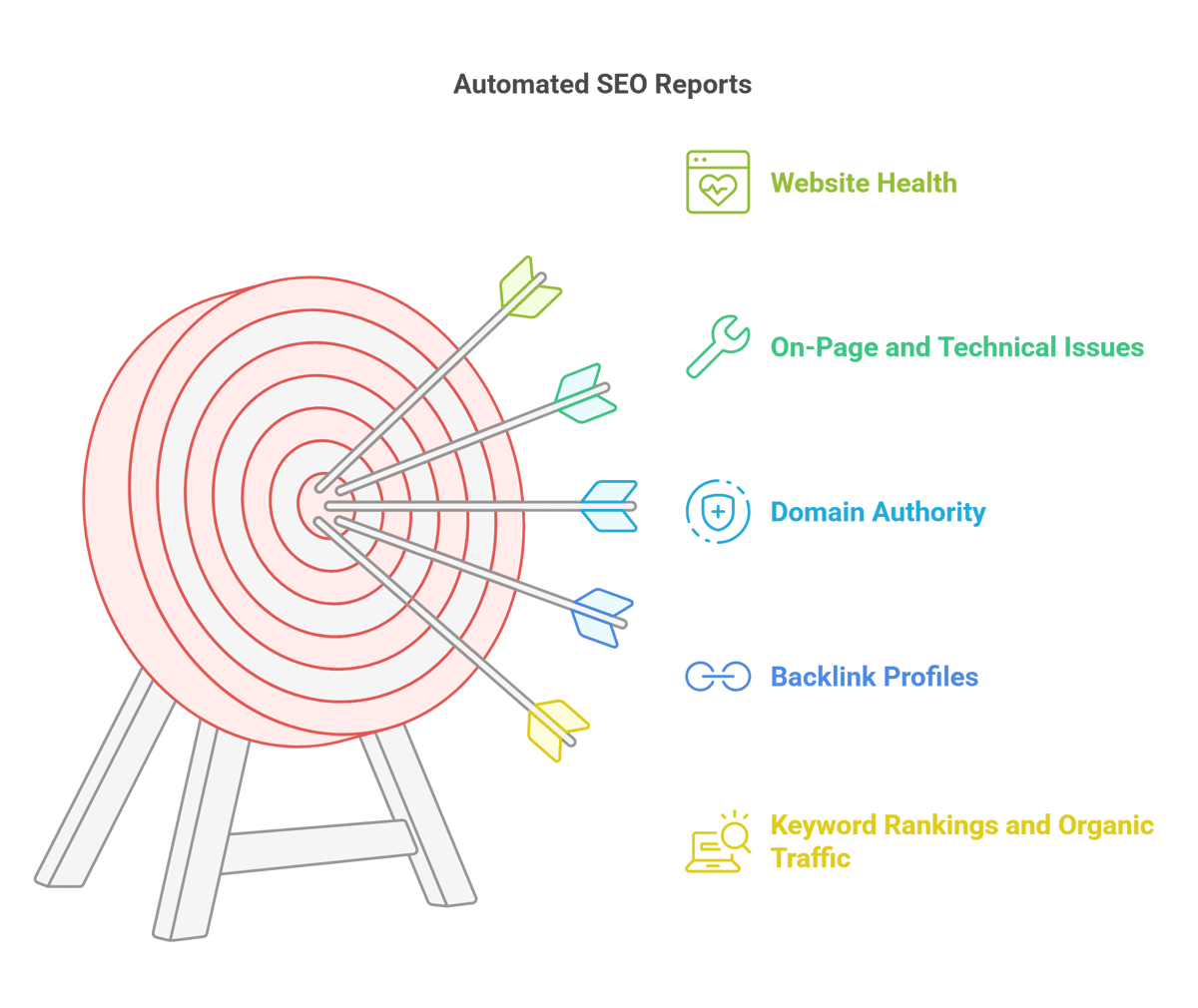
Automated SEO reports are like regular checkups for your website. They’re created by special tools that gather information from different places and show you how your website is doing. These reports are created automatically, so you don’t have to worry about checking everything yourself. Here’s a breakdown of the important things they track:
- Keyword Rankings
Keywords are words people type into search engines when looking for something. The report tells you how well your website is doing for those words. For example, if you're running a website about soccer, it will show how your site ranks for terms like "best soccer shoes." - Organic Traffic
This is the number of people who visit your website through search engines (like Google), without you having to pay for ads. The report will show if more or fewer people are finding your website naturally. - Backlink Profiles
Backlinks are links from other websites that point to your site. They’re important because they tell Google that your website is trusted. The report tracks these links to make sure you’re getting good ones from reliable websites. - Domain Authority
Domain authority is like a score for how strong and trustworthy your website is. Websites with higher authority rank better in search results. The report will tell you how strong your website is compared to others. - On-Page and Technical SEO Issues
These are things that need to be fixed on your website to make it easier for search engines to understand and rank. The report checks things like broken links, slow loading times, or missing keywords. Fixing these issues can help your site rank better.
In short, automated SEO reports help you keep track of your website’s health and find ways to improve it without having to do all the work yourself.
Why Are Automated SEO Reports Important?
- Time-SavingGenerating detailed reports manually can take hours. Automation allows you to focus on strategy and execution rather than repetitive tasks.
- ConsistencyAutomated reports ensure regular updates, whether daily, weekly, or monthly. This consistency helps you track progress over time.
- Data AccuracyPulling data directly from trusted sources reduces the likelihood of errors and discrepancies.
- Real-Time InsightsMany tools provide real-time reporting capabilities, enabling you to make timely decisions based on the latest performance metrics.
- Customizable for StakeholdersAutomated reports can be tailored for different audiences, such as clients, executives, or team members, providing only the most relevant data for each.
Key Metrics to Include in Automated SEO Reports
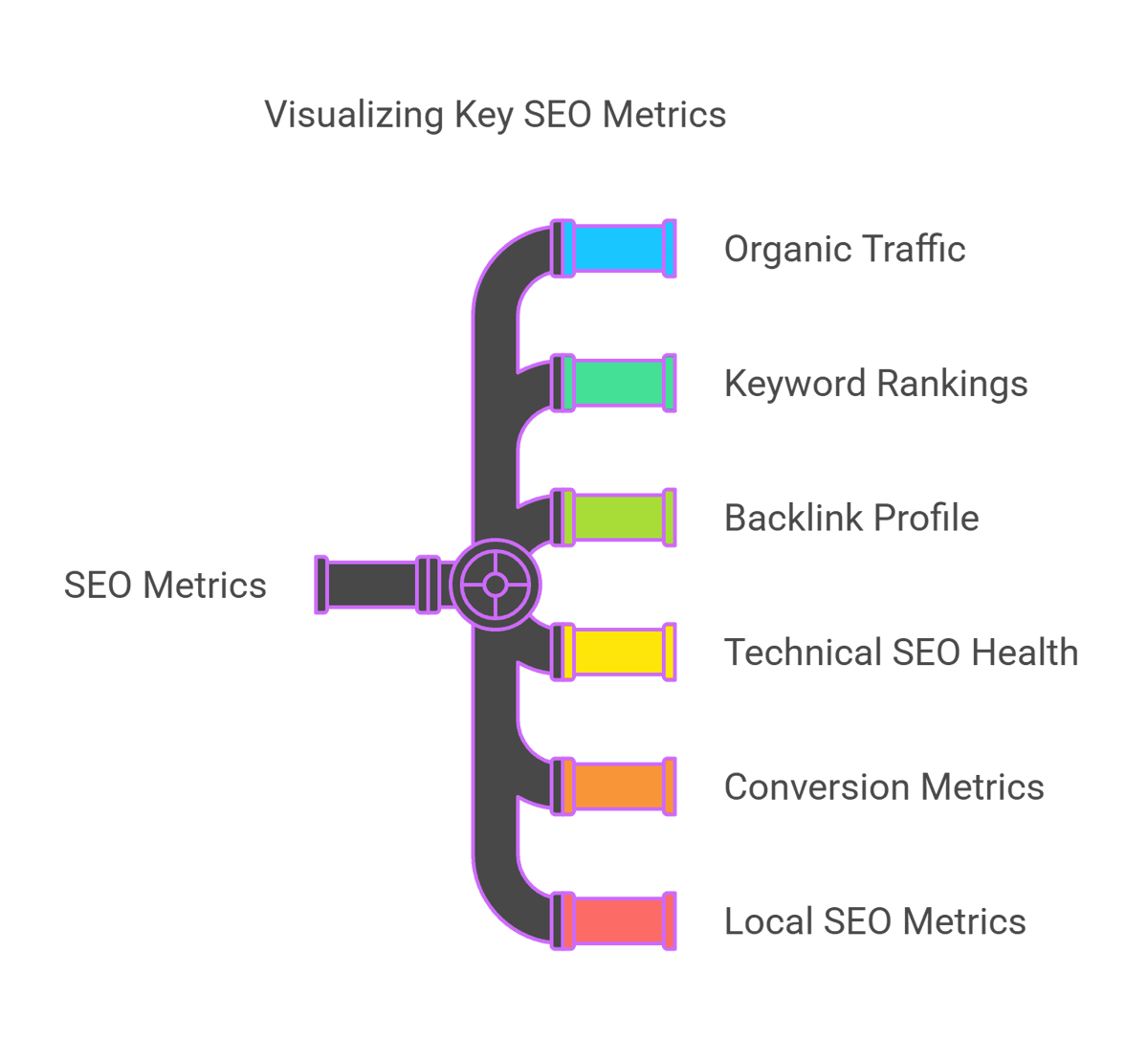
When you set up automated SEO reports, these are the important things you should track to make sure your website is doing well:
-
Organic Traffic
This shows how many people visit your website through search engines (like Google), without you paying for ads.- Total visits: How many people came to your site from search engines
- Trends over time: Tracks if visits are going up or down over time (daily, weekly, or monthly).
- Top-performing pages: Which pages on your site get the most visitors.
-
Keyword Rankings
This shows how well your website is doing for the keywords you want to rank for (the words people search for).- Current rankings: Where your website ranks for the keywords you're focusing on.
- Ranking improvements or drops: This shows if your rankings have gone up or down.
- Competitor keyword comparisons: See how your rankings compare to your competitors.
-
Backlink Profile
Backlinks are links from other websites that point to yours. The more good backlinks you have, the better your site ranks.- Total number of backlinks: How many websites are linking to your site.
- New and lost backlinks: This shows if you've gained or lost any backlinks.
- Referring domains and their quality: Tells you how trustworthy the websites linking to you are.
-
Technical SEO Health
This checks if any problems with your website could stop it from being easily found or ranked by search engines.- Crawl errors: If search engines are having trouble reading your website.
- Site speed and Core Web Vitals: How fast your website loads, which affects user experience.
- Mobile-friendliness: If your site is easy to use on mobile devices.
-
Conversion Metrics
This tracks if visitors take important actions on your site, like filling out a form or buying something.- Goal completions: The number of times people do important actions (e.g., filling out a form, making a purchase).
- Conversion rates from organic traffic: How many people from search engines completed a goal (like buying something).
-
Local SEO Metrics (if applicable)
If your business is local, these metrics help track how well you are performing in your area.- Google My Business impressions and actions: How often your business shows up in local searches and what people do after finding you.
- Local keyword rankings: How well your website ranks for local search terms (e.g., “best pizza in [your city]”).
- Reviews and ratings: Shows what people are saying about your business and how high your ratings are.
By tracking these metrics, you can see exactly how your website is performing, where you need to improve, and how you can stay ahead of your competition.
Report estimates as estimates
Automated reports pull heavily from third-party tools, and it is worth being honest in the report about what that data is. Experienced SEOs are candid about it. As one put it in an r/SEO thread:
"Both tools are guessing. None of them have real data. They never had it and they never will. Any seasoned SEO knows that, so you work with what you have. An informed guess is still better than a random one, and that is why we use them." (u/AbleInvestment2866, r/SEO)
Good automated reporting leans on the sources closest to truth, Search Console and analytics, for the headline numbers, and treats third-party metrics as directional context. That honesty is what keeps a report trustworthy, and it is a benefit in itself.
Benefits of Automated SEO Reports for Agencies
For SEO agencies, using automated reports can make their work much easier and more effective. Here’s how:
-
Scalability
When agencies have lots of clients, it can be hard to track all their data manually. Automated reports make it easier to manage multiple clients at once, without slowing down or missing any important details. This allows agencies to take on more work while maintaining the same level of quality. -
Professional Presentation
With automated reports, agencies can use templates that are already designed to look polished and professional. These reports can be customized with the agency’s logo, colors, and other branding, making it easy to share high-quality, client-ready reports that look great every time. -
Improved Transparency
Automated SEO reports can be shared with clients regularly, so they’re always up to date on their website’s progress. This openness helps build trust between the agency and the client, showing that the agency is staying on top of things and working hard to improve results. -
Enhanced Decision-Making
Automated reports give quick insights into how well a website is performing. Agencies can spot problems or areas for improvement right away and make decisions on what to do next. This makes it easier to adjust strategies quickly and keep improving SEO efforts for their clients.
In short, automated reports save time, improve communication and help agencies make smarter, faster decisions to grow their clients’ online presence.
Tools to Consider for Automated SEO Reporting
- Google Data Studio: Integrates with multiple platforms for in-depth, customizable reporting.
- BacklinkBot.ai: Automates backlink monitoring and delivers actionable insights for link-building campaigns.
Common Pitfalls to Avoid
- Information OverloadAvoid cluttering reports with unnecessary data. Focus on actionable insights that align with your goals.
- Infrequent UpdatesFailing to provide regular updates can lead to outdated insights and missed opportunities.
- Ignoring Data AccuracyAlways verify the data sources in your reports to maintain credibility and reliability.
A 2023 study by Backlinko found that websites with more than 3,000 backlinks tend to rank higher in Google search results, demonstrating the strong impact of quality backlinks on SEO success. Additionally, a report by SEMrush revealed that businesses using automated reporting tools experience up to a 60% reduction in manual reporting time, allowing teams to focus on strategy and improving client results. Such data highlights the importance of automation in optimizing SEO performance and efficiency.
Conclusion
Automated SEO reports are an essential tool for tracking your website’s performance efficiently and effectively. By saving time, ensuring accuracy, and providing consistent updates, they empower businesses and agencies to make informed decisions that drive results.
If you're looking for a tool to simplify backlink tracking and reporting, consider BacklinkBot.ai. With its automation capabilities, you can stay on top of your SEO game and focus on strategies that matter most.
Start automating your SEO reports today and unlock a smarter, more simplified way to measure success!

FAQ
-
What are automated SEO reports?
Automated SEO reports are pre-scheduled, automated summaries of your website’s performance metrics. These reports track essential data, including keyword rankings, organic traffic, backlinks, and technical SEO issues, saving time and ensuring accuracy.
-
Why should I use automated SEO reports?
Automated SEO reports save time, provide consistent updates, improve data accuracy, and offer real-time insights. They also allow you to customize reports for different stakeholders, such as clients, team members, or executives.
-
What key metrics should I include in automated SEO reports?
Key metrics include organic traffic, keyword rankings, backlink profile, technical SEO health, conversion metrics, and local SEO metrics (if applicable).
-
How do I set up automated SEO reports?
Choose the right tools (like Google Data Studio or BacklinkBot.ai), define your reporting goals, set a schedule, customize the report for your audience, and automate the delivery process.
-
What are the benefits of automated SEO reports for agencies?
Automated reports help agencies scale efficiently, maintain professional presentations, improve transparency with clients, and enhance decision-making by providing clear, actionable insights.
Want these links without the spreadsheet?
We submit your product to 100+ directories by hand, starting at $99. Or the agent finds and pitches the pages already ranking for your keywords for $99 a month. Either way, you see every link before it goes live.