Mastering Backlink Search for SEO Success
I remember when I first started building websites back in 2010. I spent weeks designing the perfect site for my small business, only to wonder why nobody could find it. That's when I stumbled across backlinks - those magical little pathways from other websites that point to yours. Fifteen years later, I'm still amazed at how much these digital votes of confidence matter for search rankings.
Look, if you're struggling with visibility, I've been there. This guide comes from years of trial and error (mostly error, if I'm honest). I'll walk you through finding backlinks using Google's tools and give you some practical steps that actually work - not just theory.
What Are We Talking About When We Say "Backlink Search"?
At its core, backlink search is just detective work - figuring out which websites are linking to you or your competitors. Search engines like Google see these links as little endorsements. More quality backlinks generally means better rankings.
I search for backlinks regularly because:
- It shows me who's mentioning my site (sometimes surprising!)
- It helps me spot new opportunities for getting more links
- I can check if any sketchy sites are linking to me and fix it.
Finding Backlinks Through Google: My Go-To Methods
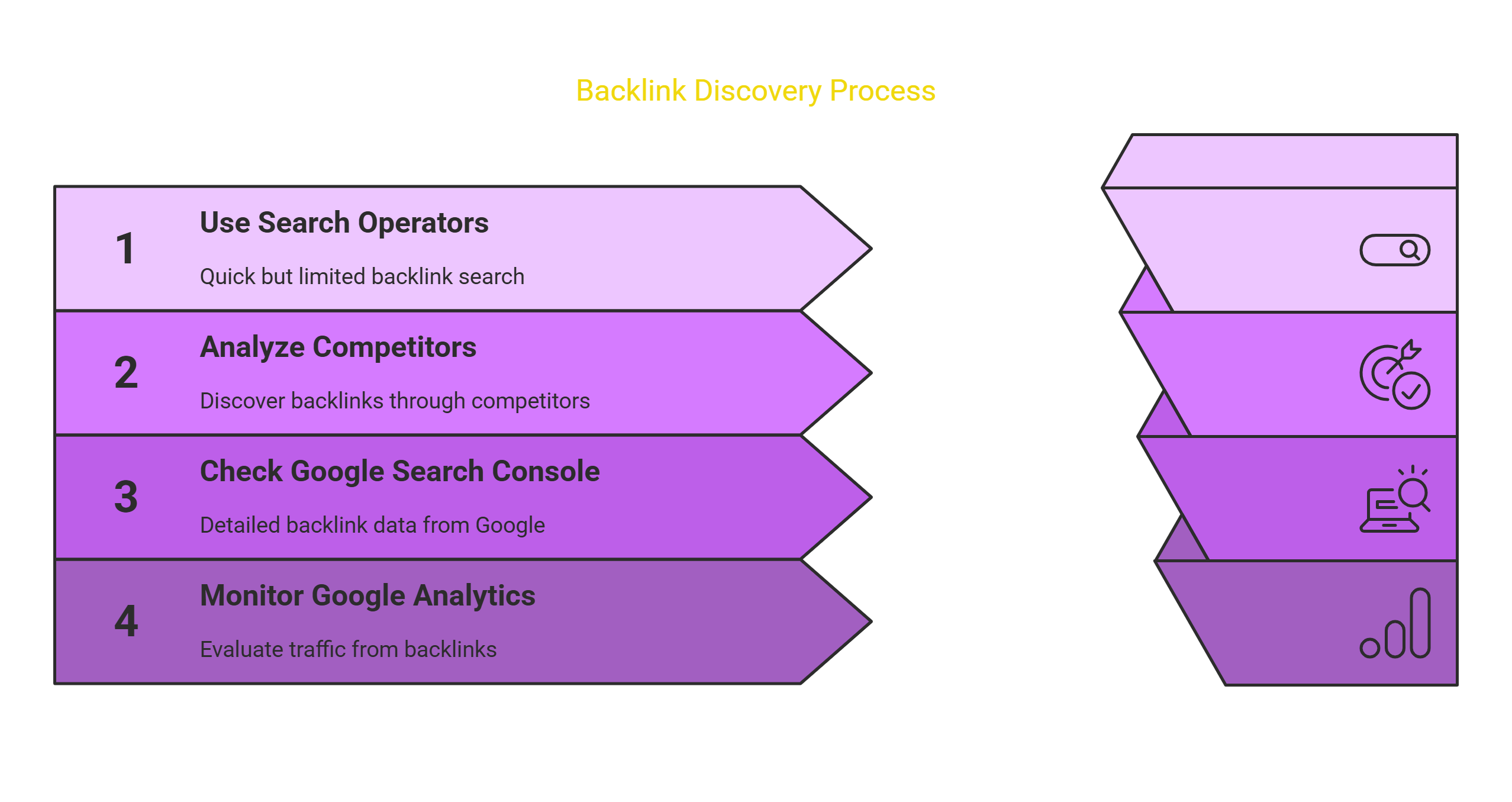
I've tried dozens of approaches over the years. These four have consistently worked the best for me:
1. Google Search Operators - Quick but Limited
The simplest method I use is Google's search operators. Just type:
link:yourwebsite.com
Replace that with your actual website, of course.
This gives you a rough list of pages linking to your site. Fair warning though - Google doesn't show everything here. I'd estimate you only see about 20-30% of your actual backlinks this way. Still, it's a quick first step that costs nothing.
I checked my photography blog this way last month and discovered three links I didn't know existed!
2. Snooping on Your Competitors
One of my favorite tactics! Instead of obsessing over your own backlinks, look at who's linking to your competitors:
link:competitorwebsite.com
I did this for a client's accounting firm last year. We found that several local business directories were linking to their competitors but not to them. Quick fix, massive results.
3. Google Search Console - The Free Essential
I check Google Search Console at least twice a month. It's free and gives you much better data than just searching Google:
- Log into Search Console (you've set this up, right?)
- Click "Links" in the left sidebar
- Look under "External Links" for your backlink data
When I started regularly checking Search Console for my outdoor gear site, I noticed several spam links had appeared overnight. I was able to disavow them before they caused problems.
4. Google Analytics - Follow the Traffic
While not technically a backlink tool, I always keep an eye on my referral traffic in Google Analytics:
- Open Analytics
- Go to Acquisition → All Traffic → Referrals
This shows you which links are actually sending people to your site. Sometimes the most valuable backlinks aren't from the highest-authority sites but from highly relevant ones with engaged audiences.
My cooking blog gets fewer visitors from a link on a major food site than from a tiny specialized baking forum. Quality over quantity.
What To Do With All This Backlink Information
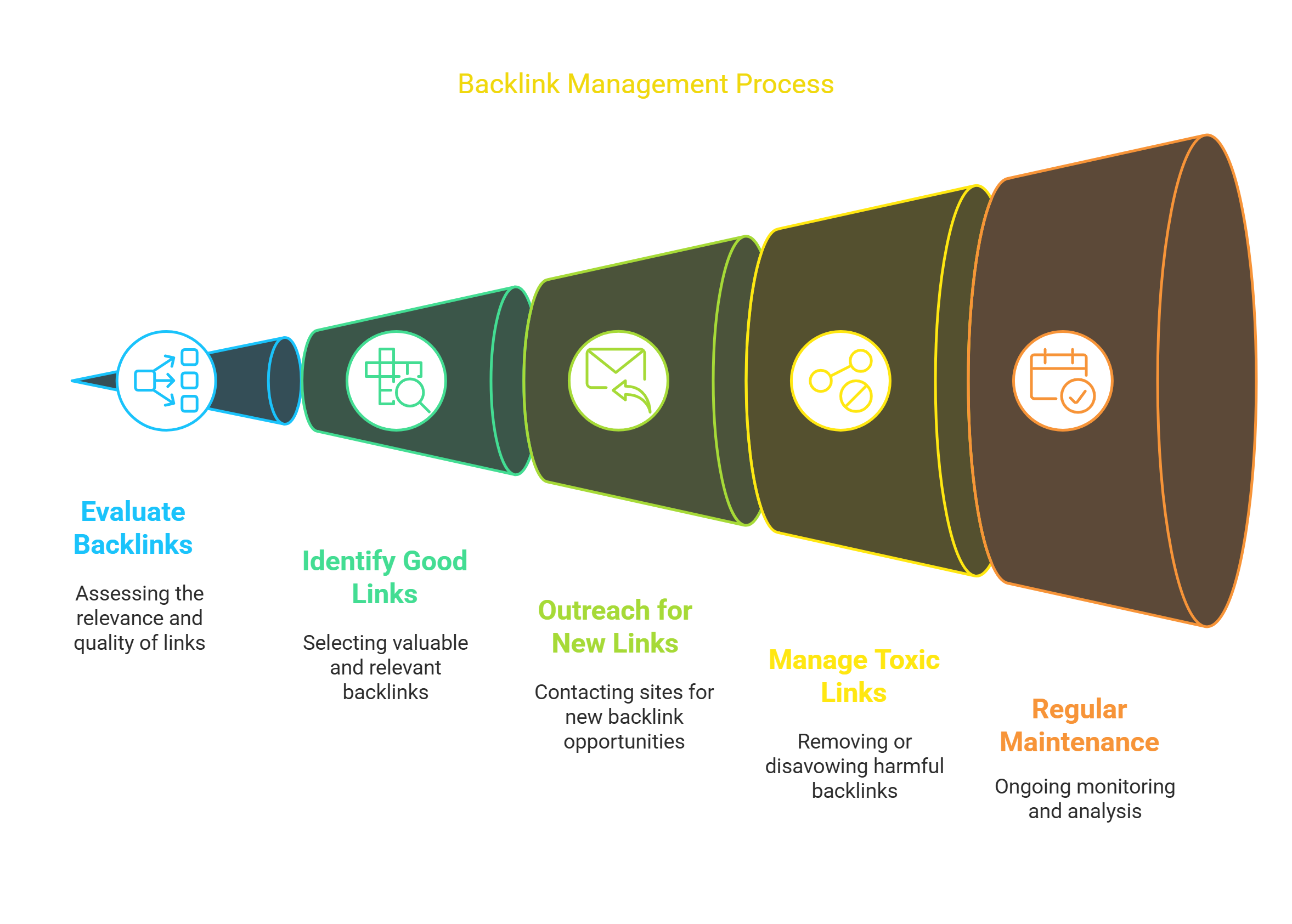
Finding the links is just step one. Here's how I actually use this information:
1. Separating the Good Links from the Bad
Not all backlinks help you. Some might actually hurt. When I evaluate a backlink, I ask myself:
- Does this site have anything to do with my niche? (My dog training site doesn't need links from cryptocurrency blogs)
- Does the site look legitimate or like it was built overnight?
- Would I be embarrassed if someone saw my site linked from there?
- Is the link on a page that actual humans visit?
I learned this lesson the hard way when my first website tanked in rankings because of links from sketchy overseas directories. Quality matters way more than quantity.
2. Getting More Good Backlinks
Once you know who links to your competitors, you've got a treasure map:
- Make a spreadsheet of sites linking to competitors but not to you
- Check which ones are worth pursuing (see my quality criteria above)
- Find the right contact person (not just info@website.com)
- Send a SHORT email explaining why linking to your content helps THEM
My success rate with this approach is about 8-12%. Not amazing, but when you consider how valuable each link can be, it's worth it.
My most successful outreach email last year was just three sentences long. I mentioned a specific article on their site, pointed out a gap in information, and suggested my guide as a resource. That's it.
3. Dealing with Toxic Backlinks
Sometimes you find gross-looking links pointing to your site. Here's my approach:
- Try contacting the site owner to remove the link (works maybe 30% of the time)
- If that fails, use Google's Disavow Tool as a last resort
I had to disavow about 50 links to my finance blog last year after it got hit by a negative SEO attack. Rankings recovered within three weeks.
4. Keeping Tabs on Your Link Profile
Backlink maintenance isn't a one-time thing. I schedule regular check-ups:
- Weekly quick scan in Search Console
- Monthly deeper dive using more advanced tools
- Quarterly competitor analysis
I missed a monthly check once last summer, and didn't notice several valuable links had disappeared when a partnering website redesigned their resource page. Could have fixed it quickly if I'd been paying attention.
Why I'm Obsessed With Backlinks
After years of SEO work, I still believe backlinks are the single most important external ranking factor:
- They're the clearest signal to Google that others value your content
- Quality backlinks send targeted visitors who actually care about your topic
- Each good backlink builds your site's authority, making future ranking easier
My home service client jumped from page 3 to page 1 for their main keyword after just six quality backlinks from local business sites.
Conclusion
Look, backlink building isn't sexy work. It's research, outreach, and relationship building. It takes time. But I've watched it transform struggling websites into successful ones too many times to count.
Start with the Google tools I've mentioned. They're free and powerful enough to make a difference. Track what you're doing. Be patient. And remember that one amazing backlink can outperform dozens of mediocre ones.
Your website's future success depends on the work you put in today. So stop reading and start searching for those backlinks.
FAQ
Q: Which tool do you actually use for backlink research?
A: Google Search Console is my everyday go-to because it's free, but I pay for SEMrush for deeper research. Ahrefs is fantastic if you can afford it. I used Moz for years but switched recently.
Q: Can bad backlinks really hurt my website?
A: Unfortunately, yes. I've seen it firsthand. A client's site got linked from a network of gambling sites, and their rankings dropped within weeks. We disavowed those links and had to work for months to recover.
Q: How do I convince big websites to link to me?
A: Start smaller. Build relationships with medium-authority sites first. Create genuinely useful content. Then when approaching bigger sites, come with data showing your content performs well. My best high-authority backlink came after six months of relationship building.
Q: How can I tell if a backlink is actually helping?
A: Watch for correlation between new backlinks and ranking improvements for related keywords. Also check if you're getting referral traffic from the link - that's often the best sign of a quality link.
Q: Should I check backlinks weekly, monthly, or what?
A: I check Search Console weekly but only spend about 10 minutes on it. Once a month, I do a deeper analysis that takes about an hour. That's enough for most small to medium websites.