
The short version
- Learn why outbound links matter for SEO, trust, and user experience.
- Discover 10 smart ways to use them and avoid common mistakes in content strategy.
On this page6 sections
- What Are Outbound Links, Anyway?
- Why I Started Taking Outbound Links Seriously
- They Make Your Content More Helpful
- Google Actually Likes Them
- They Connect You to Your Industry
- They Add Credibility to Your Claims
- They Create Context
- Outbound links as a quality signal
- 10 Ways to Get Outbound Links Right (From Someone Who Got Them Wrong)
- 1. Link to Sites You'd Recommend to a Friend
- 2. Make Your Anchor Text Sound Natural
- 3. Find the "Just Right" Amount
- 4. Know When to Use the "Nofollow" Tag
- 5. Don't Force People Off Your Site
- 6. Check Your Links (Because They Break)
- 7. Link When It Makes Sense, Not Just at the End
- 8. Mix Up Your Sources
- 9. Go Deep, Not Shallow
- 10. Help Readers Spot External Links
- Final Thoughts
- FAQs
Have you ever read a blog post that felt like it was written in a vacuum? There were no references, no mentions of other experts, and certainly no links to back up any claims. It probably left you feeling a bit sceptical, right?
That's exactly why outbound links matter so much. They're not just random exits from your website – they're your content's way of joining the conversation happening across the internet.
What Are Outbound Links, Anyway?
Simply put, outbound links are those clickable pathways that lead from your website to someone else's. They come in two main flavours:
-
Those regular external links pointing to other websites
-
The affiliate or referral links that might earn you a commission when readers click through
Why I Started Taking Outbound Links Seriously
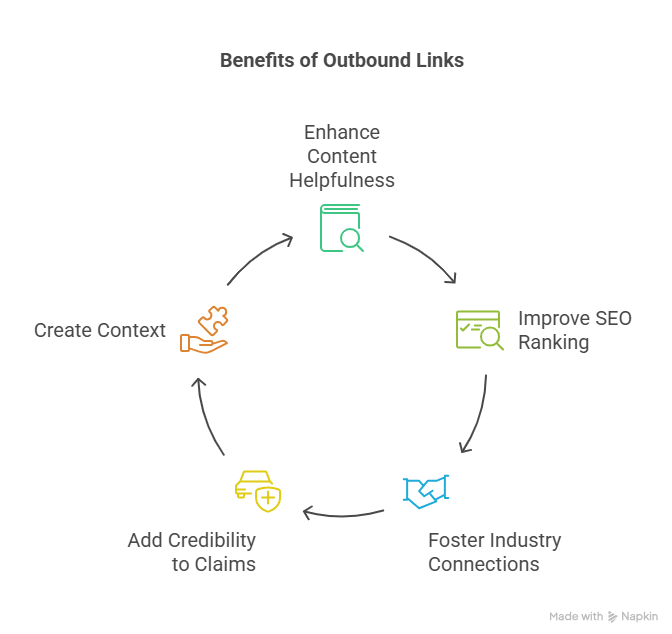
I'll be honest – I used to think linking out was just giving away "link juice" and sending my hard-earned visitors elsewhere. Boy, was I wrong! Here's what changed my mind:
They Make Your Content More Helpful
Think about it – when you're reading something interesting and the author points you toward even more great resources, don't you appreciate that? Your readers feel the same way.
Last month, I wrote a piece about home gardening techniques. After linking to several university agricultural extension sites to back up my advice, I received multiple comments thanking me for the additional resources. People actually bookmarked my article as their starting point for gardening information!
Google Actually Likes Them
Here's something that surprised me: search engines view quality outbound links as a sign that you're creating well-researched content. It makes perfect sense when you think about it – you're showing Google you've done your homework.
They Connect You to Your Industry
I never expected this benefit, but after consistently linking to industry experts in my field, some of them started noticing. A few even reached out for collaboration opportunities! It's like sending little digital handshakes across the web.
They Add Credibility to Your Claims
Let's face it – we're living in an era of "pics or it didn't happen." When you make claims in your content, backing them up with links to trustworthy sources is like saying, "Don't just take my word for it – here's the proof."
They Create Context
Have you ever tried explaining a complex concept and wished you could just point to someone who's already explained it perfectly? That's exactly what outbound links let you do.
Outbound links as a quality signal
Why bother linking out at all? Because well-chosen outbound links to authoritative sources are part of what makes content read as genuinely researched, and that kind of quality is what search rewards. One SEO framed the broader principle well in an r/SEO thread:
"SEO gets way clearer once you stop thinking in terms of 'good content' and start thinking in terms of measurable signals: clicks, links, and topical footprint." (u/AlirezaMaalekpour, r/SEO)
Thoughtful outbound links to credible, relevant sources are one of those signals, they place your page in a real topical neighborhood and back your claims with verifiable sources. The ten practices below are about doing that deliberately rather than either hoarding link equity or linking out carelessly.
10 Ways to Get Outbound Links Right (From Someone Who Got Them Wrong)
After years of trial and error (and yes, some embarrassing mistakes), here's what I've learned about doing outbound links properly:
1. Link to Sites You'd Recommend to a Friend
Think of outbound links as personal recommendations. Would you send your best friend to this website? If not, don't send your readers there either.
When I write about mental health topics, I only link to resources I'd genuinely recommend to someone I care about – places like reputable psychological associations or well-researched articles from trusted health publications.
2. Make Your Anchor Text Sound Natural
Nobody talks by saying "click here" in regular conversation, so why write that way? Instead of "For gardening tips, click here," try "These gardening tips from the University of Minnesota transformed my vegetable patch last summer."
3. Find the "Just Right" Amount
I once made the mistake of including so many links that my article looked like a Christmas tree. The next week, I overcorrected and published a 2,000-word post with zero outbound links.
Now I aim for what feels natural – usually 2-4 outbound links per 1,000 words, though sometimes more if I'm covering something that needs lots of references.
4. Know When to Use the "Nofollow" Tag
I learned this one the hard way. If you're linking to something you were paid to promote or content you can't fully vouch for, add the "nofollow" attribute. It's not just good SEO – it's honest.
5. Don't Force People Off Your Site
Remember when clicking a link would unexpectedly whisk you away from what you were reading? Frustrating, right? Set your outbound links to open in new tabs so readers can explore without losing their place on your site.
6. Check Your Links (Because They Break)
Nothing undermines your credibility faster than sending people to the dreaded 404 page. I've started setting calendar reminders every three months to check my most important posts for broken links. It's a small effort that keeps my content trustworthy.
7. Link When It Makes Sense, Not Just at the End
Have you noticed how annoying it is when an article saves all its references for a giant dump at the end? I try to place links right where readers might be thinking, "I wonder if there's more information about this specific point?"
8. Mix Up Your Sources
Repeatedly linking to the same website can start to look suspicious (or just boring). I try to share a variety of perspectives from different sources – it makes for richer content and shows I've really explored the topic.
9. Go Deep, Not Shallow
When I first started blogging, I lazily linked to website homepages. Now I know better – it's much more helpful to link directly to the specific article or resource that addresses the exact point I'm referencing.
Instead of linking to Cnn.com when mentioning a news story, I link to the actual article about that specific event.
10. Help Readers Spot External Links
Have you ever been surprised when a link took you to a completely different website? I now use subtle visual cues like a small external link icon (↗) or slightly different formatting for outbound links so readers know what to expect when they click.
Final Thoughts
Here's what I've learned after years of website building: outbound links aren't just SEO tactics – they're about being a good digital citizen. They acknowledge that you're part of a bigger conversation, and they show respect for both your readers and the broader community of content creators.
When done thoughtfully, outbound links don't send people away permanently – they actually give people more reasons to trust you and come back for more of your well-connected, trustworthy content.
So go ahead and link generously (but wisely). Your readers will thank you, and eventually, so will your analytics.
FAQs
1. What are outbound links in SEO?
Outbound links are hyperlinks that point from your website to external sources. They boost credibility, support your claims, and signal to search engines that your content is connected to trustworthy information across the web.
2. Do outbound links improve SEO rankings?
Yes, when used correctly. Linking to authoritative, relevant sources shows search engines your content is well-researched. It enhances user experience and can positively impact how Google evaluates your page quality and topical relevance.
3. How many outbound links should a blog post have?
A good rule of thumb is 2–4 outbound links per 1,000 words, but it depends on the topic. Prioritise quality over quantity, and only link when it genuinely adds value for your reader.
4. Should outbound links open in a new tab?
Yes. Opening outbound links in a new tab ensures your readers don’t lose your content. It improves usability and keeps your website as the central hub of their browsing experience.
Want these links without the spreadsheet?
We submit your product to 100+ directories by hand, starting at $99. Or the agent finds and pitches the pages already ranking for your keywords for $99 a month. Either way, you see every link before it goes live.